

This post may contain affiliate links. Read the full disclosure
If you’re still buying a physical SIM card at the airport or paying roaming fees on your home plan, this Airalo eSIM review is for you.
We’ve been using eSIMs for travel for several years now, and Airalo has been our go-to across New Zealand, Japan, Thailand, China, Singapore, Macau and Hong Kong. After a recent side-by-side comparison with a competitor on the same trip, we’re more convinced than ever that Airalo is the eSIM provider worth recommending.
Here’s our honest Airalo review, plus a guide on how it works, how much eSIM data you need and what options are available.

What Is An eSIM?
An eSIM is a digital SIM card built into your phone that lets you connect to a local network at your destination without physically swapping SIM cards.
You purchase a data package online before you travel, install it in minutes, and you have local data coverage from the moment you land.
For families travelling internationally, it means:
- No hunting for a SIM kiosk at the airport when you’re jet-lagged
- No worrying about losing tiny SIM cards
- No paying your home carrier’s international roaming rates
- Data working immediately when you get off the plane
- Different packages for each country if you’re doing a multi-country trip
The catch is that your phone needs to support eSIM technology. Most modern smartphones do: iPhones from the XR and XS onwards, Samsung Galaxy from S20 onwards, Google Pixel 3 onwards and many others.
Check Airalo’s device compatibility list if you’re unsure.
Where Does Airalo Work?
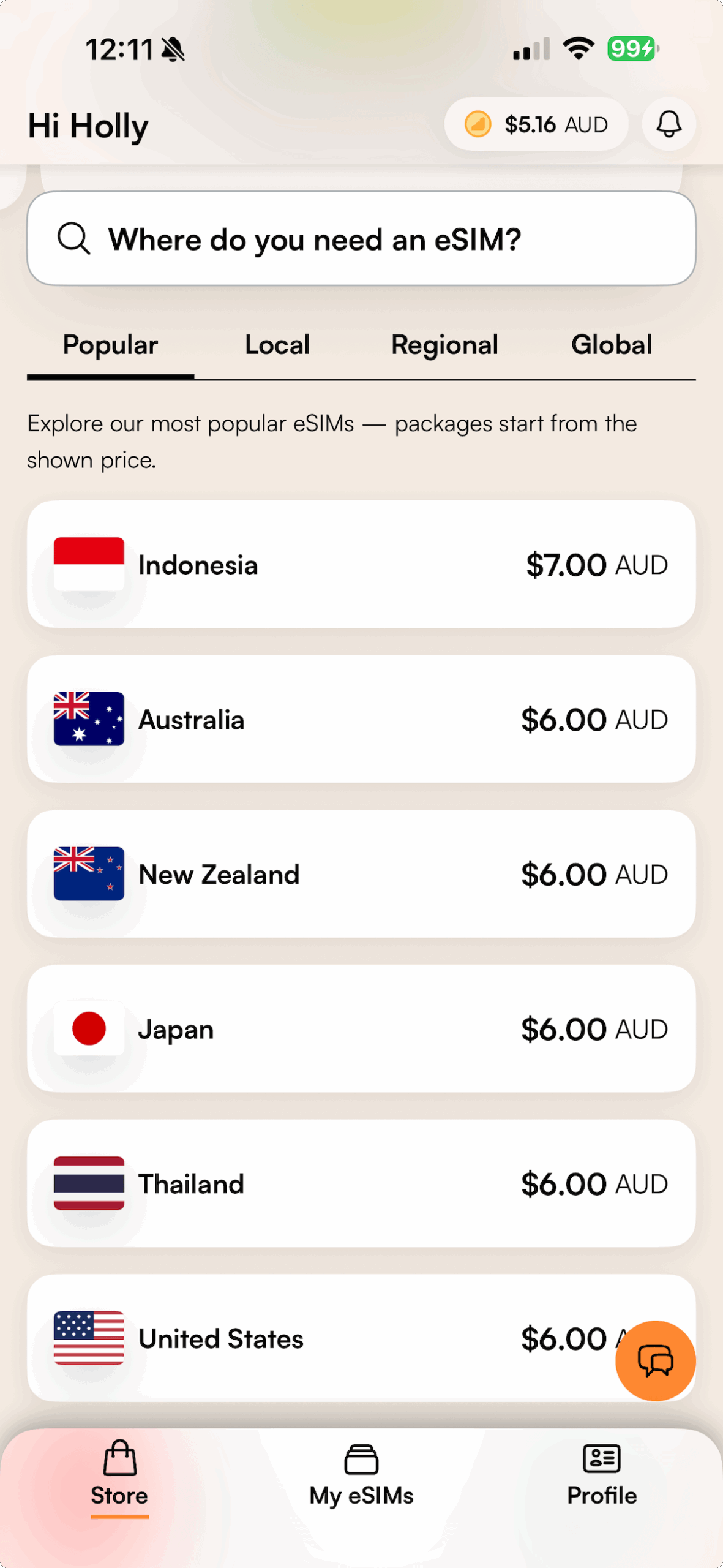
Airalo covers 200+ destinations worldwide, which for practical purposes means almost everywhere you’re likely to travel.
Their eSIM store includes individual country coverage across Asia, Europe, the Americas, the Middle East, Africa and Oceania, as well as regional and global options for multi-country trips.
The Three Types of Airalo eSIM
Understanding which type to buy before you start shopping makes the whole process faster.
Local eSIMs
A local eSIM covers a single country. If your trip is one destination only, such as Japan, Singapore, or New Zealand, a local eSIM is usually the best value. You buy exactly what you need for that one country and nothing more.
Regional eSIMs
A regional eSIM covers multiple countries across a whole region.
If you’re doing a multi-country trip through Asia, Europe or another region, a regional eSIM means buying once rather than purchasing a separate eSIM for each country on your itinerary.
Regional Asia packages start from around $6 USD for example, which is what we used for our recent trip covering Singapore, Hong Kong, Macau and China.
The key advantage is convenience. One install, one package, coverage that follows you across borders.
The trade-off is that regional eSIMs can sometimes offer slightly less data per dollar than buying local eSIMs for each country individually. For a multi-country trip though, the simplicity usually wins over switching between eSIMs during your trip.
Global eSIMs
A global eSIM works across multiple continents and is the most flexible option. If your trip spans Asia and Europe, or you’re a frequent traveller who wants one eSIM that works on any trip, a global eSIM removes the need to buy a new one each time.
How Much Data Do I Need?
This is the question most people get stuck on when buying an eSIM, and the honest answer is: less than you think, unless you’re planning to stream or work remotely.
What counts as normal data usage when travelling?
A standard traveller holiday (navigation, messaging, social media browsing, emails, occasional googling) uses roughly:
- Navigation (Google Maps, Amap, Apple Maps): around 5-10MB per hour of active use
- WhatsApp messages and photo sharing: minimal for text, around 1-2MB per photo shared
- Social media browsing (Instagram, Facebook): around 50-100MB per hour of scrolling
- Emails: very light, a few MB per day
- Web browsing: varies, roughly 20-50MB per hour
What uses data fast:
- Video streaming (Netflix, YouTube): around 1GB per hour
- Video calls (FaceTime, WhatsApp calls): around 200-400MB per hour
- Uploading photos or video to social media: 2-10MB per photo, much more for video
Data Guide By Trip Length
7-day trip (standard traveller)
Recommendation: 3GB
This covers daily navigation, messaging, social media browsing and emails comfortably with room to spare. If you’re sharing the occasional photo to social or checking things online throughout the day, 3GB is more than enough for a week. If you’re very light on social media, 1GB might cover you, but 3GB gives you a comfortable buffer.
14-day trip (standard traveller)
Recommendation: 5GB
Our usual choice for a two-week trip. 5GB covers daily navigation, regular messaging, social media use and occasional browsing across a fortnight without needing to monitor your usage. This is typically what Simon will get. My usage is higher with running the blog social media and video, so I tend to get double.
3-week trip (standard traveller)
Recommendation: 10GB
For a three-week trip at standard usage, 10GB gives you enough data to use your phone normally without thinking about it. If you’re somewhere like China where navigation apps are constantly running in the background, you’ll find you go through data slightly faster than usual, so the extra buffer helps.
When To Consider Unlimited Data
Go unlimited if you are:
- Working remotely while travelling (emails, video calls, uploading files)
- Planning to upload significant amounts of video or content to social media
- Streaming video content regularly rather than downloading before you travel
- Travelling with kids who want to stream or play data-heavy games
For a standard holiday where you’re sightseeing and only using your phone for navigation and messaging, unlimited is usually unnecessary and a standard data package is better value.
I had an unlimited data plan for one of our multi-destination trips which allowed me to hotspot my tablet and allow the kids to use my data for their devices at times too, in places where Wi-Fi was patchy.
I also upload a lot of photos, stories and videos while travelling and running a travel blog, so unlimited works well.
Our Airalo Experience Across Multiple Trips
We’ve tested Airalo across seven destinations over several years: New Zealand, Japan, Thailand, China, Singapore, Macau and Hong Kong.
Across all of those trips, the experience has been consistently reliable.
There was one exception: Simon had a one-hour outage in Singapore during our most recent Asia trip. It was frustrating in the moment, but Airalo proactively sent an alert to customers acknowledging the issue and apologising for it.
A company that admits when something went wrong and communicates about it is one worth sticking with.
Beyond that single outage, we haven’t had connection problems across any of these countries.
The most memorable Airalo moment was during our anniversary trip to Thailand. We were out on the water near the Phi Phi Islands, surrounded by ocean in most directions, and I was sending photos home to our daughters.

The connection worked. That’s impressive! I think even our eldest daughter was stunned when she got photos of the ocean while we were in the middle of it. So far it has been the best eSIM for travel, for us.
The Comparison That Settled It: Airalo vs Holafly On The Same Trip
On our most recent Asia trip, Simon used Airalo as always, and I decided to trial a competitor, Holafly, for comparison purposes.
We were doing Singapore, Hong Kong and Macau. The first test came at the Hong Kong to Macau crossing.
My Holafly stopped working somewhere during the crossing. I had to connect to WiFi to contact their support team and spent over an hour going back and forth with them. Their eventual solution was to issue a completely new eSIM.
The process was slow and while the support was bumped up to team leader level and they tried many things, it was time-consuming and frustrating when in the end, the new ESIM was the solution and could have been done sooner.
Being without data while navigating a new destination is not an enjoyable experience.
Then we returned from Macau back to Hong Kong the next day. The exact same thing happened again. Another support chat, another wait, another new eSIM being issued. At that point the experiment was over.
Simon’s Airalo? No issues at either crossing.
To be fair to Holafly, this was specifically at the HK-Macau border crossing and may relate to how that particular crossing handles network transitions. But having it happen twice on the same trip is enough to know which one I’m recommending.
How Airalo Works
Step 1: Check your device is compatible
Go to Airalo’s device compatibility page and confirm your phone supports eSIM. Most modern smartphones do.
Step 2: Choose your package
Download the Airalo app or visit airalo.com. Select whether you need a local (single country), regional (multi-country) or global eSIM, then choose a data package based on how much data you’ll use and how long you’ll be there. See our data guide above if you’re not sure how much to buy.
Data packages are available by size, starting from small amounts up to larger packages. We typically go for a 5GB package for a standard two-week trip. Unlimited data plans are also available for heavy users, anyone working remotely, uploading a lot of media or streaming during their trip.
Prices start from around USD $4 for popular destinations. Regional Asia packages start from around $6 USD. China eSIMs start from around $11.50 USD. Prices vary by destination and data size and are subject to change.
Step 3: Install before you leave
You can install the eSIM before you travel and keep it inactive until you land. This is what we do. The eSIM activates when it connects to the supported network at your destination.
Important: Set up the eSIM while you’re still connected to your home carrier’s SIM. Some eSIM-related apps require SMS verification from your home number, once you’ve switched to the eSIM only, you won’t receive those texts. This is particularly important in China, where apps like Alipay and WeChat require SMS verification. See our China travel tips for the full rundown.
Step 4: On arrival
Switch to your Airalo eSIM. In our experience, there’s sometimes a short wait for it to come live, which is completely normal. If it isn’t connecting, check that your roaming tab is switched on in your phone settings. This catches people out more than anything else and is usually the fix.
Simon had one occasion where an old eSIM still installed on his phone caused a conflict. Deleting the old eSIM and a little help from support resolved it.
What We Love About Airalo
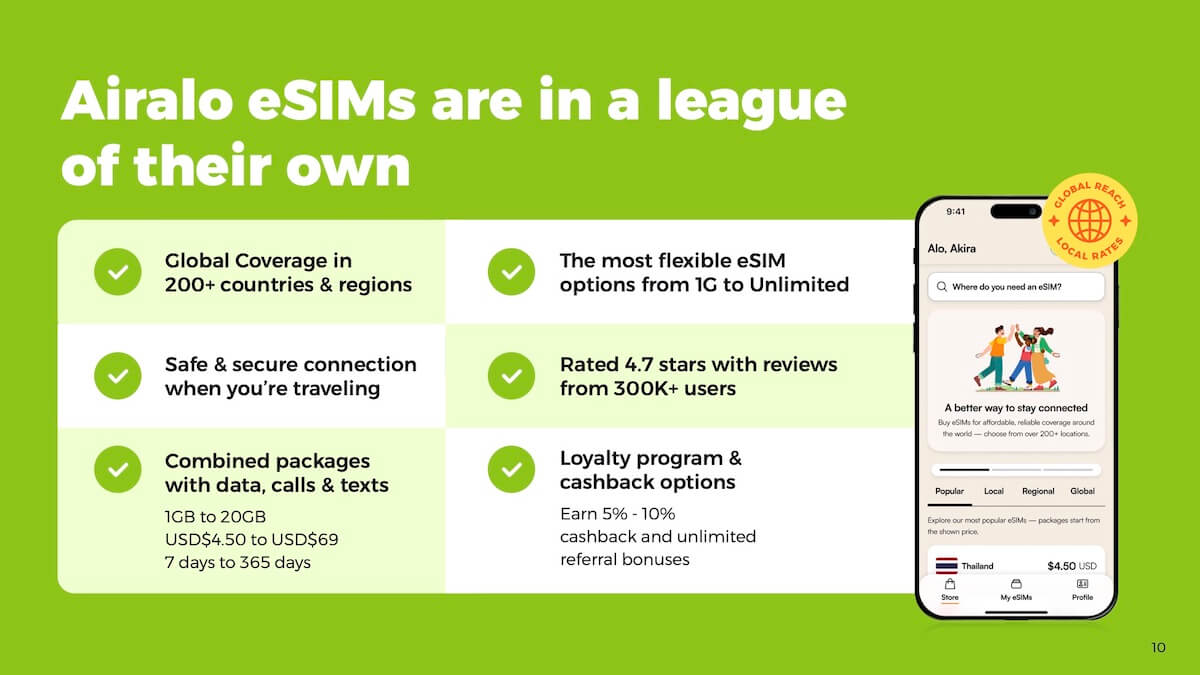
Reliable across multiple countries. New Zealand, Japan, Thailand, China, Singapore, Macau, Hong Kong, all consistent. The Singapore outage was the only hiccup across all of those trips combined, and they communicated about it proactively.
The app makes topping up simple. If you run out of data partway through your trip, you can buy more directly in the Airalo app without needing to hunt for a shop or connect to WiFi first. This has saved us more than once.
Regional and global packages. If you’re doing a multi-country trip, a regional eSIM covers multiple destinations under one purchase rather than buying separately for each country.
24/7 support. If something does go wrong, their support team is available around the clock in multiple languages.
Refer a friend for credit. Airalo has a referral program where you earn credit when someone signs up using your link. If you travel regularly, this stacks up.
30 million users and counting. The scale of Airalo’s network means they’ve worked out most of the kinks. They’re one of the market leaders in travel eSIMs for a reason.
What To Keep In Mind
Not always the cheapest option. Airalo is competitively priced but not always the cheapest eSIM on the market. For us, reliability is worth the small price premium. You can find cheaper alternatives but as we discovered with Holafly, cheaper doesn’t always mean better.
Your phone must support eSIM. Check compatibility before purchasing. Older phones won’t work.
Some networks are limited in certain regions. Coverage varies by country and network. Generally very good across the destinations we’ve travelled to, but worth checking the specific country page before purchasing.
A short activation delay is normal. When you land and switch over, there can be a few minutes before the eSIM fully comes live. This is normal and not an indication that something is wrong.
Check your roaming settings. If it isn’t connecting, the first thing to check is whether roaming is switched on in your phone settings.
Airalo vs Physical SIM Cards
| Airalo eSIM | Physical SIM | |
|---|---|---|
| Setup | Before you leave home | At airport or local shop on arrival |
| Cost | Competitive, varies by destination | Varies |
| Speed | Instant on arrival | Time to buy and insert |
| Multiple countries | Regional/global plans available | Need a new SIM per country |
| Losing the card | Not possible | Possible |
| Top up | In the app | Varies by provider |
Our Airalo eSim Review: Is Airalo Worth It?
Yes. We have used Airalo many times in many destinations and it has never let us down. For the way we travel, multiple countries, multiple people in the family needing data, visiting destinations where staying connected matters, Airalo is exactly what we need.
The Holafly experiment on our last trip made the case more clearly than any number of trips where everything just worked. When the eSIM stopped working at the Macau border crossing, and I spent an hour on support chat to get it resolved, only for the same thing to happen again on the return journey, Simon’s Airalo was working the whole time perfectly.
That’s the comparison that settled it. Reliability is worth paying a little more for. Airalo gives us that.
FAQ
Does Airalo work in China?
Yes. China eSIMs are available. Note that many Western apps (Google, WhatsApp, Instagram) are blocked in mainland China regardless of your eSIM provider, you’ll need an eSIM with a built-in VPN for those, which is separate from the Airalo data eSIM. WhatsApp, Google and Instagram did work, but not Tiktok. Read our China travel tips for the full guide.
How do I check if my phone supports eSIM?
Visit Airalo’s device compatibility page for the full list. Most iPhones from XR/XS onwards and most flagship Android phones from around 2020 onwards support eSIM.
Can you use Airalo in multiple countries on one trip?
Yes. You can buy a regional eSIM (covering a whole region like Asia or Europe), a global eSIM that works worldwide without switching between eSIMs, or individual country eSIMs. For a multi-country trip like our Asia itinerary, we found the regional eSIM gave great coverage.
How do I top up my Airalo eSIM?
Through the Airalo app. You can buy additional data directly in the app without needing to visit a shop or find a new SIM.
Is Airalo the cheapest eSIM?
Not always. There are cheaper providers but reliability varies. After our experience comparing Airalo with Holafly on the same trip, we’d rather pay a little more for consistent connection.
How do I refer friends and earn credit?
Airalo has a referral program accessible in the app. When someone signs up using your link, you both earn credit toward future purchases. The more you travel, the more it adds up.